Amiga Joystick Port Pinout: Complete Guide for Retro Gamers & Adapter Buyers
The joystick ports on machines like the Amiga 500, Amiga 1200, and Amiga 2000 use a standard 9-pin D-Sub connector and is compatible with Atari joystick standard the basic amiga mode provides 4 directions and 2 fire buttons (the majority of games only support a single fire button) – the extended CD32 gamepad mode enables directions and 7 buttons to be used

Amiga Joystick Port Overview
The Amiga uses a DB9 (DE-9) female connector for each joystick port. The Amga uses the first port for the Mouse and second port for Joystick, for two player games the mouse can be removed and two joysticks can be used.
-
Digital joysticks
-
Two-button controllers (2 independent fire buttons)
-
Mice
-
Paddle controllers (via POT lines)
- CD32 Mode enables 7 button support in some games (Usually CD32 game conversions for AGA machines)
Unlike some other systems, the Amiga joystick port also integrates analog inputs and power lines, making it more versatile — and more complex.
Amiga Joystick Port Pinout
Below is the standard Amiga joystick port pinout:
| Pin | Signal | Description |
|---|---|---|
| 1 | Up | Digital Up input |
| 2 | Down | Digital Down input |
| 3 | Left | Digital Left input |
| 4 | Right | Digital Right input |
| 5 | POT X | POT X – Analog / Paddle X – CD32 Latch |
| 6 | Fire 1 | Primary Fire button |
| 7 | +5V | +5V supply |
| 8 | GND | Ground |
| 9 | Fire 2 | POT Y – Analog / Paddle Y |
Important Electrical Notes
-
All direction and fire inputs are active low
-
Internal pull-up resistors are used
-
+5V (Pin 7) can power low-current adapters
-
POT lines are used by mice and paddle controllers
Amiga vs Atari Joystick Pinout Differences
The Amiga joystick port is mechanically compatible with the Atari and Kempston joystick standard.
This is why dedicated Amiga-compatible adapters are highly recommended.
Compatible Controllers
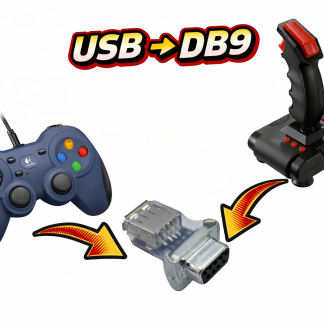
The standard classic joysticks like the Atari CX Stick, Quickshot, Zipstick and Competition Pro 9 pin models are all compatible – but with modern USB to 9 pin adapters like the TruMouse gamepad adapters you can use modern controllers with the Amiga
Amiga CD32 Mode
The Amiga CD32 uses the same physical DB9 connector but adds a multiplexed button system for extra buttons, with an adapter that supports the CD32 mode you can play CD32 WHDLOAD conversion on your amiga and the CD32 Console