Posted on

Retro Mouse & Joystick Adapters for Amiga, Atari ST, BBC, MSX & Mini Consoles

Upgrade your classic retro computer or mini console with high-quality modern mouse, keyboard and joystick adapters. Our range of precision-engineered adapters allows you to connect USB mice, modern keyboards and contemporary gamepads to legendary systems including the Commodore Amiga, Atari ST, Acorn BBC Micro, Archimedes, MSX and popular mini consoles.

Whether you are restoring original hardware or enhancing your gaming experience, our adapters provide reliable plug-and-play compatibility without modifying your machine.


Commodore Amiga Mouse & Joystick Adapters

Bring modern control to your Amiga setup with USB mouse adapters and joystick converters compatible with classic systems and mini recreations.

  • USB Mouse and Keyboard Adapters for A500, A500 Plus, A600, A1200, A1500, A2000, A3000, A4000 and CD32
  • Joystick & Gamepad Adapters
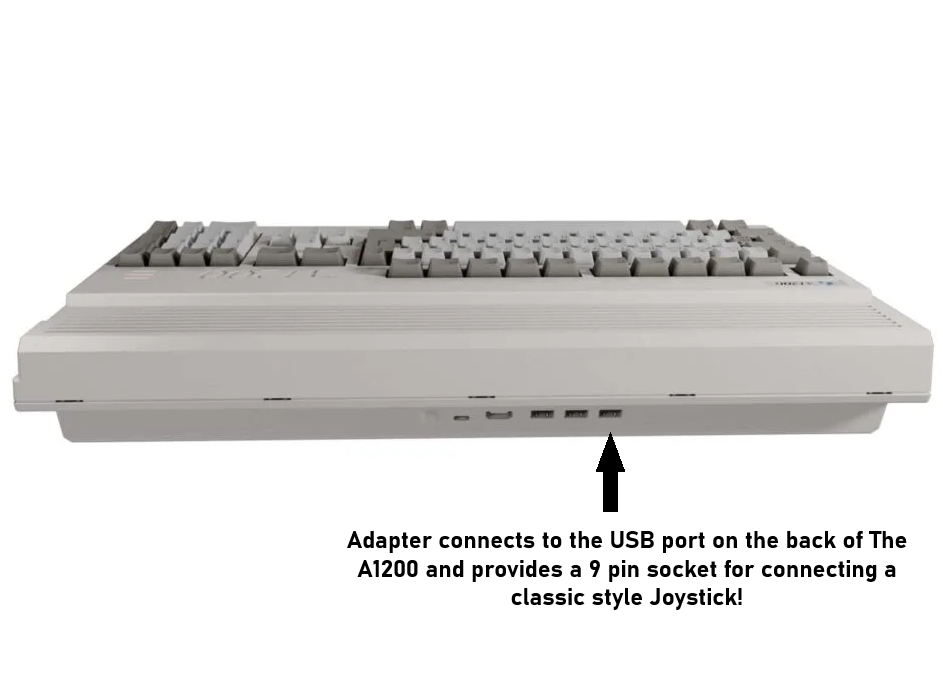
  • Joystick Adapters for The A500 Mini, The A1200, The C64 Mini and The Spectrum
  • Low latency performance for gaming

Atari ST USB Mouse & Controller Adapters

Replace ageing Atari ST mice with modern optical USB mice or upgrade your joystick setup with reliable controller adapters.

  • Atari ST USB Mouse Adapters
  • Precision optical mouse support
  • Joystick & Gamepad Converters
  • Simple plug and play installation

Acorn BBC Micro & Archimedes Adapters

Enhance your Acorn systems with modern peripherals while preserving original hardware integrity.

  • BBC Micro Mouse Adapters
  • Archimedes USB Mouse Support
  • Joystick Adapters for Retro Gaming
  • Reliable, stable and responsive performance

MSX Mouse & Joystick Adapters

Upgrade your MSX computer with modern control solutions designed for smooth operation and broad compatibility.

  • MSX USB Mouse Adapters
  • Modern Gamepad & Joystick Support
  • Designed for accuracy and low input lag

Mini Console & Modern System Compatibility

Our 9 pin joystick adapters are also compatible with popular mini retro systems, allowing you to improve control precision and comfort.

  • The A500 Mini
  • The C64 Mini
  • The C64 Maxi
  • The A1200
  • The Spectrum
  • Windows PC’s

Why Choose Our Retro Adapters?

  • Plug and play — no internal modification required
  • Designed for retro enthusiasts and collectors
  • Tested for compatibility and stability
  • Precision engineered for minimal latency
  • Ideal for gaming, development and restoration projects

Browse our full range of retro computer adapters and modernise your classic setup today.

Posted on

Amiga joystick port pinout

Amiga Joystick Port Pinout: Complete Guide for Retro Gamers & Adapter Buyers

The joystick ports on machines like the Amiga 500, Amiga 1200, and Amiga 2000 use a standard 9-pin D-Sub connector and is compatible with  Atari joystick standard the basic amiga mode provides 4 directions and 2 fire buttons (the majority of games only support a single fire button) – the extended CD32 gamepad mode enables directions and 7 buttons to be used


Amiga Joystick Port Overview

The Amiga uses a DB9 (DE-9) female connector for each joystick port.  The Amga uses the first port for the Mouse and second port for Joystick, for two player games the mouse can be removed and two joysticks can be used.

  • Digital joysticks

  • Two-button controllers (2 independent fire buttons)

  • Mice

  • Paddle controllers (via POT lines)

  • CD32 Mode enables 7 button support in some games (Usually CD32 game conversions for AGA machines)

Unlike some other systems, the Amiga joystick port also integrates analog inputs and power lines, making it more versatile — and more complex.


Amiga Joystick Port Pinout

Below is the standard Amiga joystick port pinout:

Pin Signal Description
1 Up Digital Up input
2 Down Digital Down input
3 Left Digital Left input
4 Right Digital Right input
5 POT X POT X – Analog / Paddle X – CD32 Latch
6 Fire 1 Primary Fire button
7 +5V +5V supply
8 GND Ground
9 Fire 2 POT Y – Analog / Paddle Y

Important Electrical Notes

  • All direction and fire inputs are active low

  • Internal pull-up resistors are used

  • +5V (Pin 7) can power low-current adapters

  • POT lines are used by mice and paddle controllers


Amiga vs Atari Joystick Pinout Differences

The Amiga joystick port is mechanically compatible with the Atari and Kempston joystick standard.

This is why dedicated Amiga-compatible adapters are highly recommended.


Compatible Controllers

The standard classic joysticks like the Atari CX Stick, Quickshot, Zipstick and Competition Pro 9 pin models are all compatible – but with modern USB to 9 pin adapters like the TruMouse gamepad adapters you can use modern controllers with the Amiga


Amiga CD32  Mode

The Amiga CD32 uses the same physical DB9 connector but adds a multiplexed button system for extra buttons, with an adapter that supports the CD32 mode you can play CD32 WHDLOAD conversion on your amiga and the CD32 Console

Posted on

USB to 9 Pin Adapter for Amiga, Atari ST & CD32 | Use Modern Controllers

Play Classic Games with Modern USB Controllers on Your Commodore Amiga and Atari ST

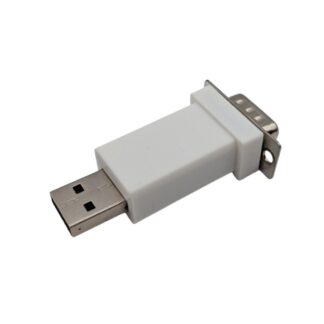
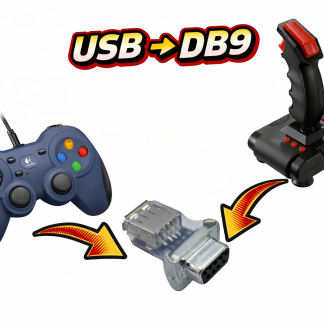
Love your Commodore Amiga or Atari ST, but tired of struggling with old joysticks? With our USB to 9-pin DE9/DB9 adapter, you can now use modern USB gamepads and joysticks on these vintage systems—including the Amiga CD32—without any hassle.

Why You Need a USB to DE9 Adapter

Vintage computers rely on 9-pin DE9 ports, which aren’t compatible with today’s USB controllers. That’s where a USB to DE9 adapter comes in. It converts modern USB signals into the format your classic system expects, letting you enjoy retro gaming with the comfort of today’s controllers.

Our adapters work perfectly with:

  • Retrogames Ltd controllers

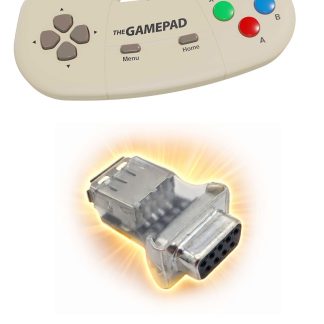
  • TheGamePad

  • TheQuickShot2

  • C64 Joystick

  • Speedlink Competition Pro Joystick

  • Logitech F310 and F710 gamepads

…and many more USB controllers, ensuring you can play on Amiga, Atari ST, and Amiga CD32.

Features of Our USB to DE9 Adapters

When choosing an adapter, look for:

  1. Plug-and-play simplicity – just connect and play

  2. Supports multiple USB controllers – works with gamepads and joysticks from major brands

  3. High responsiveness – accurate inputs for fast-paced games

  4. Durable design – made for long-term use on vintage hardware

How to Connect Your Controller

  1. Connect your USB controller (e.g., Logitech F310, Retrogames Ltd, or Speedlink Competition Pro) to the adapter

  2. Plug the adapter into your Amiga, Amiga CD32, or Atari ST joystick port

  3. Power on your system and start playing—no drivers or software hacks required


Who Should Get a USB to DE9 Adapter?

  • Retro gamers looking for a modern controller experience

  • Players who want to protect vintage joystick ports

  • Anyone who owns a Commodore Amiga, Amiga CD32, or Atari ST

Why Buy From Us?

Our adapters are specially built for retro systems. We prioritize quality, reliability, and easy setup so you can focus on gaming, not troubleshooting.

We also provide:

  • Fast shipping

  • Secure payment options

  • Dedicated customer support

Upgrade Your Retro Gaming Today

Don’t let outdated joysticks hold you back. Use modern USB controllers with your Commodore Amiga, Amiga CD32, or Atari ST using our USB to DE9/DB9 adapter. Compatible with controllers like TheQuickShot2, Retrogames Ltd, C64 joystick, Speedlink Competition Pro, and Logitech F310/F710, your classic games have never been more fun or comfortable to play.

Play Amiga CD32 Games and WHDLoad Conversions with full 7-Button CD32 Mode Support

For Amiga enthusiasts who want the full Amiga CD32 experience, there’s a special adapter designed to bring modern USB controllers to both Amiga CD32 consoles and regular Amiga computers.

Unlike standard USB to DE9 adapters, this adapter fully supports the 7-button mode, which is required for many CD32 games and WHDLoad CD32 conversions.

With this adapter, you can:

  • Use modern USB specific gamepads and Joysticks on Amiga CD32 games that require 7 buttons

  • Play WHDLoad game conversions on classic Amiga computers with complete button functionality and still use as in standard joystick mode in Amiga games

  • Avoid the limitations of traditional 2-button or 3-button joystick adapters

  • Enjoy plug-and-play setup with no drivers or software tweaks required

Whether you’re playing action-packed CD32 titles or classic WHDLoad conversions, this adapter ensures reliable gameplay giving you the comfort of modern gaming controllers while preserving your vintage hardware.

Also available is a SNES Style USB Gamepad that includes the CD32 adapter – simple solution to expensive and hard to find original CD32 game controllers

Posted on

Amiga Joystick Adapters – Complete Guide to Classic, USB & Modern Options

Looking to use modern joysticks or controllers with your classic Amiga? This guide covers everything about Amiga joystick adapters, including USB, PS/2, and wireless options, compatibility with all models, troubleshooting, and recommended adapters.

What Is an Amiga Joystick Adapter?

Classic Amiga joysticks use a DE-9 (DB9) port with digital signals for X/Y movement and buttons. Modern joysticks (USB, wireless, or console controllers) require an adapter to interface with these ports.

  • Compatible with A500, A600, A1200, A2000
  • Adapters convert USB, PS/2, or wireless signals to DB9 format
  • Enables use of modern controllers in retro games

Types of Amiga Joystick Adapters

USB-to-Amiga DB9 Adapters

Allows connection of USB joysticks/gamepads to Amiga. Works with most PC gamepads and modern controllers. Some adapters are plug-and-play, others require firmware.

PS/2-to-Amiga Adapters

Converts PS/2 joysticks or mice to DB9. Reliable, low latency, and supports classic PS/2 controllers.

Wireless & Bluetooth Adapters

Allows modern wireless controllers to work with Amiga. Usually requires a USB-to-DB9 interface. Check compatibility for latency-sensitive games.

Amiga Joystick and Gamepad Compatibility Table

Adapter Type Compatible Amiga Models Supports USB/Wireless Notes
USB-to-DB9 Adapter A500, A600, A1200, A2000 ✔ USB Compact, plug-and-play, reliable
Bluetooth Adapter + USB DB9 A600, A1200 ✔ Wireless gamepads May require firmware updates

How to Connect a USB Joystick to Your Amiga

  1. Turn off your Amiga.
  2. Connect your USB joystick to the USB-to-DB9 adapter.
  3. Plug the adapter into the joystick port.
  4. Power on your Amiga.
  5. Test in your favorite games or Workbench apps.

Tip: Some adapters include sensitivity settings — adjust them for smoother control.

Troubleshooting Common Issues

Joystick Not Working

  • Ensure adapter compatibility with your Amiga model
  • Try a different USB controller
  • Do not use hubs for USB connections

Buttons Don’t Register

  • Check if adapter supports extra buttons the Trumouse CD32 adapter allows upto 7 buttons in cd32 mode
  • Some adapters only map the one or two buttons to DB9 – most amiga games only support 1 fire button

Which Amiga Joystick Adapter Should You Buy?

Adapter Pros Cons Best For
USB-to-DB9 Adapter Plug-and-play, reliable Limited to first two buttons for some adapters Most users
PS/2 to DB9 Adapter Very low latency No USB support Classic joystick feel
Bluetooth Adapter + USB Wireless, flexible May require firmware updates Wireless convenience, casual gaming

FAQ

Can I use a modern USB joystick on an Amiga?

Yes, using a compatible USB-to-DB9 joystick adapter.

Does the adapter work with A500, A600, and A1200?

Most USB adapters work across these models, but always check the product details.

Can I use wireless controllers?

Yes, with Bluetooth or USB-to-DB9 adapters designed for wireless input.

Do all adapters support all buttons?

No, some only map the first two buttons; check the adapter specs for extra button support.

Recommended Products