*** Coming Soon ***
BlueCube USB Gamepad & Joystick Adapter: Use Modern USB Controllers on Amiga, Atari ST & Commodore 64
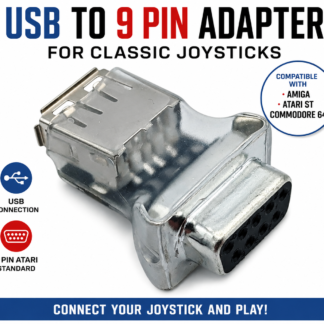
Want to use a modern USB gamepad with your classic Amiga, Atari ST or Commodore 64? Meet BlueCube — the USB Gamepad & Joystick Adapter designed to bring modern USB controller compatibility to classic computers with a compatible 9-pin Atari-style joystick port.
Featuring plug-and-play operation, broad compatibility with standard USB HID game controllers and a unique controller-learning mode, BlueCube gives retro gaming enthusiasts more freedom to choose how they play their favourite classic games.
But what really makes BlueCube stand out is its ability to learn the controls of compatible USB gamepads it doesn’t initially recognise. Combined with three fire functions, including a dedicated jump-button option for classic platform games, BlueCube offers more than a conventional joystick adapter.
Whether you’re revisiting legendary Amiga games, enjoying Atari ST classics or returning to the 8-bit era of the Commodore 64, BlueCube is designed to make your retro gaming setup more flexible.
What Is the BlueCube USB Gamepad & Joystick Adapter?
BlueCube is a USB game controller adapter that allows compatible standard USB HID gamepads to work with classic computers that use a compatible 9-pin Atari-style joystick interface.
Supported systems include:
- Commodore Amiga — enjoy classic 16-bit games with compatible USB gamepads.
- Atari ST — bring alternative controller options to your Atari gaming setup.
- Commodore 64 — explore new controller possibilities for classic 8-bit gaming.
- Other compatible systems — use supported USB controllers with computers featuring compatible 9-pin Atari-style joystick ports.
Rather than being restricted to original joysticks or a single controller model, BlueCube lets you use many standard USB HID game controllers, giving you more choice over the way you play.
And thanks to its unique learning mode, BlueCube can learn the required inputs of compatible controllers that it doesn’t initially recognise.
Unique Controller-Learning Mode — Teach BlueCube to Recognise Your Gamepad
One of BlueCube’s biggest selling points is its unique ability to learn the controls of an unrecognised compatible USB game controller.
Many joystick adapters rely on predefined mappings or a limited selection of supported controllers. BlueCube takes a more flexible approach by allowing you to teach it the controls of a compatible USB HID gamepad using a simple sequence of directional and fire-button inputs.
This means you aren’t necessarily limited to controllers that BlueCube recognises straight out of the box.
How Does BlueCube’s Learning Mode Work?
BlueCube uses a straightforward learning sequence. When learning mode is activated the LED will light and stay on , the cube is waiting for the following sequence, if you make a mistake turn off and start again, once all 7 presses have been made the cube will flash to show config is now been saved – the cube can store upto 5 controllers, if you lean another controller it will overwrite the oldest controller settings.
Up → Down → Left → Right → Fire 1 → Fire 2 → Fire 3
By entering this sequence, you teach BlueCube which controls correspond to the required joystick directions and fire functions.
Once the compatible controller has been learned, you can use it with your classic computer, making it easier to experiment with different standard USB gamepads and their button layouts.
The learning mode is especially useful for retro gamers who already own several USB controllers or want the freedom to choose a gamepad that feels comfortable in their hands.
Why Is the Learning Mode Such a Big Advantage?
USB game controllers come in many shapes and sizes. Button layouts vary between manufacturers, and some controllers may not be recognised using a conventional fixed mapping.
BlueCube’s learning mode is designed to make controller compatibility more flexible and also allows the use to choose the best buttom mapping
- Learn unfamiliar controllers: Teach BlueCube the required inputs of compatible USB HID gamepads it doesn’t initially recognise.
- Choose your preferred gamepad: Enjoy greater freedom to use a controller that suits your hands and playing style.
- Configure three fire functions: Identify the controls used for primary fire, secondary fire and the additional Up/jump function.
- Get more from your retro setup: Explore a wider range of compatible USB controllers instead of relying exclusively on a predetermined selection.
This makes BlueCube particularly appealing to enthusiasts who enjoy experimenting with different hardware and finding the ideal controller for their favourite games.
Controller learning does not guarantee that every USB device will work, however. Compatibility still depends on the controller and its USB HID implementation.
Three mapped buttons for More Flexible Retro Gaming + Autofire
BlueCube supports three distinct fire functions, helping you get more from compatible USB gamepads when playing classic computer games.
Fire 1 — Primary Fire
Fire 1 is mapped to the primary fire button used for shooting, attacking and other main actions in games.
It’s the essential control for countless classic arcade games, shooters and action titles.
Fire 2 — Secondary Fire
Fire 2 is mapped to a secondary fire input for games that support an additional action button.
This is particularly useful for compatible games such as Turrican on the Amiga, where a secondary action can be an important part of gameplay.
If your game supports a second fire input, BlueCube provides a dedicated control for it.
Auto-Fire Mode for Shoot ’Em Ups
BlueCube also features a handy Auto-Fire mode for the primary fire button, making it ideal for classic shoot ’em ups and other action-packed retro games. To toggle Auto-Fire on or off, simply hold down Fire 1 and Fire 2 together for approximately 4 seconds. The blue LED will flash to indicate that Auto-Fire mode has been enabled. Once active, Auto-Fire repeatedly triggers the primary fire input, letting you keep firing without having to repeatedly press the button. It’s a great way to take on waves of enemies in classic Amiga, Atari ST and other compatible retro games while giving your fire button a well-earned rest!
Fire 3 — A Dedicated Button for Up and Jump
One of BlueCube’s most useful features for platform gaming is its additional Up/jump function.
Many classic 8-bit and 16-bit platform games use the joystick’s Up direction to make the character jump. Although this control scheme works, pressing Up to jump can feel less natural than using a dedicated button.
BlueCube maps Fire 3 to a secondary Up/jump function, allowing you to jump using a button on your compatible gamepad.
This can make platform games more comfortable to play, particularly when quick reactions and precise jumps are essential.
Instead of moving your thumb to the directional controls every time you need to jump, you can use a dedicated button for the action.
It’s a small improvement that can make a noticeable difference to the way certain classic games feel.
Plug and Play — Simple Setup for Classic Computers
BlueCube is designed to make using compatible USB gamepads with classic computers straightforward.
Connect BlueCube to a compatible 9-pin joystick port, connect a supported USB HID game controller, and get ready to play. Compatible standard gamepads offer plug-and-play operation, while the learning mode provides additional flexibility when the controller’s inputs need to be identified.
This combination of straightforward setup and flexible controller learning makes BlueCube an appealing choice for retro gamers who want to spend more time playing and less time configuring their equipment.
Whether you’re setting up a dedicated Amiga gaming station or adding another accessory to your vintage computer collection, BlueCube is designed to make the process simple.
A Compact Cube Design with a Blue LED Mode Indicator
Why the name BlueCube?
The name comes from two distinctive design features: its cube-shaped case and internal blue LED.
The blue LED is more than a decorative touch. It serves as a mode indicator, helping identify the adapter’s current operating mode.
The compact cube-shaped enclosure gives BlueCube a distinctive appearance among retro gaming accessories while keeping the focus on its practical purpose.
It’s a small accessory designed to bridge the gap between classic computer hardware and modern USB game controllers.
Why Choose BlueCube for Your Amiga, Atari ST or Commodore 64?
If you’re looking for a USB gamepad adapter for a classic computer, BlueCube combines several useful features in one compact device.
- Unique controller-learning mode: Teach BlueCube the required controls of compatible USB HID gamepads it doesn’t initially recognise.
- Broad controller compatibility: Designed to work with many standard USB HID game controllers.
- Three fire functions: Primary fire, secondary fire and a secondary Up/jump function.
- Better platform-game controls: Use a button to jump in games where Up is traditionally used.
- Plug-and-play operation: Straightforward setup with compatible standard gamepads.
- Blue LED mode indicator: A practical indicator built into the distinctive cube-shaped design.
- Classic computer support: Designed for compatible Amiga, Atari ST, Commodore 64 and other Atari-style 9-pin joystick-port systems.
The combination of controller learning and three fire functions is what makes BlueCube stand out. Rather than simply converting USB input into joystick signals, it offers additional flexibility for choosing and configuring a compatible gamepad for classic gaming.
BlueCube Compatibility: Which Controllers Work?
BlueCube is designed for broad compatibility with standard USB HID game controllers, but not every USB gamepad is supported.
Designed for
- Classic computers with a compatible 9-pin Atari-style joystick interface.
- Standard USB HID game controllers supported by the adapter.
- Compatible gamepads whose directional and fire inputs can be identified using the learning mode.
Important compatibility limitations
BlueCube does not work with Xbox One controllers or modern PlayStation DualSense controllers or wireless controllers
The learning mode helps BlueCube identify unfamiliar controls on compatible devices, but it cannot overcome the power limit on vintage machines like the Commodore Amiga
If you have a specific USB controller in mind, check its compatibility before purchasing, but most standard USB wired PC joysticks and gamepads and ALL RetroGames LTD Controllers are supported
Frequently Asked Questions About BlueCube
Can I use a USB gamepad with my Amiga?
Yes. BlueCube is designed to connect many standard USB HID game controllers to compatible Amiga computers with a compatible 9-pin joystick interface.
Does BlueCube work with the Atari ST?
BlueCube is designed for compatible Atari ST systems that use the supported 9-pin Atari-style joystick interface. Controller compatibility depends on the USB gamepad used, for STFM and STE models with the joystick port on the underside you may need a joystick extension cable depending on the size of the USB plug on your controller
Can I use BlueCube with a Commodore 64?
BlueCube is designed for the Commodore 64 and other compatible classic computers with an appropriate 9-pin Atari-style joystick port. Check the compatibility of your particular setup and USB controller.
What makes BlueCube different from other USB joystick adapters?
Its unique controller-learning mode is a key differentiator. It allows you to teach BlueCube the required inputs of compatible USB HID controllers that it doesn’t initially recognise. It also provides three fire functions, including a secondary Up/jump function.
How does the controller-learning mode work?
When learning mode is activated, you enter the sequence Up, Down, Left, Right, Fire 1, Fire 2 and Fire 3 on the compatible USB gamepad. BlueCube uses this sequence to learn the controller’s required inputs.
What are Fire 1, Fire 2 and Fire 3 used for?
Fire 1 is the primary fire button. Fire 2 provides secondary fire for supported games, such as Turrican on the Amiga. Fire 3 provides a secondary Up/jump function, allowing a button to be used for jumping in compatible platform games.
Does BlueCube work with Xbox One controllers?
No. Xbox One controllers are not supported.
Does BlueCube work with PlayStation DualSense controllers?
No. Modern PlayStation DualSense controllers are not supported.
Does the blue LED have a purpose?
Yes. The internal blue LED serves as a mode indicator when in learning mode, and also indicated when Autofire is turned on and off
Give Your Classic Computer a New Way to Play
Classic computers such as the Amiga, Atari ST and Commodore 64 remain beloved for their incredible games and distinctive gaming experiences. BlueCube builds on that legacy by allowing many standard USB gamepads to be used with compatible vintage joystick ports.
Its unique controller-learning mode gives you more freedom to choose your controller, while three fire functions help bring more flexible controls to classic shooters, action games and platformers.
From plug-and-play simplicity to the extra convenience of a dedicated jump button, BlueCube is designed to make retro gaming more flexible without losing the appeal of the original hardware.
If you’re searching for a USB gamepad adapter for Amiga, an Atari ST USB joystick adapter or a USB controller adapter for Commodore 64, BlueCube is worth exploring.
BlueCube USB Gamepad & Joystick Adapter — your controller, your controls, your classic games.
Discover BlueCube and bring a new way to play to your favourite retro computer.