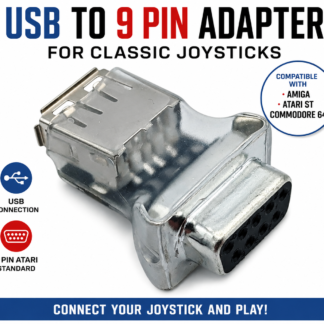
USB to 9-Pin Joystick Adapter for Amiga, Atari ST & Commodore 64
Looking for a way to use a modern USB joystick with a classic computer? This USB to 9-pin joystick adapter is designed to connect compatible USB joysticks and controllers to classic computers that use the Atari-style 9-pin joystick interface.
It is ideal for retro-computing enthusiasts who own systems such as the Commodore 64, Amiga or Atari ST and want an alternative to finding an original vintage joystick.
Connect a USB Joystick to a Classic Computer
Classic computers were designed long before USB became the standard controller connection. Many popular machines from the 1980s and 1990s used the familiar 9-pin Atari-style joystick interface.
Today, original joysticks can be difficult to find, and many surviving controllers have suffered from decades of use.
This adapter provides a practical way to bridge the gap between modern USB controllers and compatible classic computers.
The basic setup is:
USB Joystick → USB to 9-Pin Adapter → Classic Computer
The adapter converts the connection from a compatible USB joystick into the Atari-style 9-pin joystick interface used by compatible classic systems.
Compatible Classic Computers
This USB joystick adapter is designed for compatible systems using the Atari-style 9-pin joystick standard, including:
- Commodore 64 (C64)
- Commodore 128
- Amiga computers
- Atari ST
- Other compatible classic computers using the appropriate 9-pin joystick interface
Compatibility can depend on the USB joystick or controller being used, so please check your particular controller and computer before purchasing.
USB Joystick Adapter for Amiga
The Amiga remains one of the most popular classic computers for retro gaming.
If your original Amiga joystick has become worn, unreliable or difficult to replace, a compatible USB joystick combined with this adapter can provide another option.
Instead of searching for an original vintage controller, you can use a compatible modern USB joystick while continuing to enjoy your original Amiga hardware.
Whether you are restoring an Amiga or simply returning to classic games, this adapter can help connect modern controller hardware to compatible classic joystick ports.
USB Joystick Adapter for Atari ST
The Atari ST is another classic computer that used the familiar 9-pin joystick connection.
If you are looking for an Atari ST joystick replacement or want to experiment with a modern USB controller, this adapter provides a convenient connection between compatible USB controllers and the Atari-style joystick interface.
It can be particularly useful for retro-computing enthusiasts restoring an Atari ST or maintaining a vintage gaming setup.
USB Joystick Adapter for Commodore 64
The Commodore 64 has one of the largest libraries of classic joystick-based games ever produced.
From arcade games and shoot-’em-ups to platformers and sports games, the joystick is an essential part of the C64 gaming experience.
If you need a C64 joystick replacement, an original joystick is not your only option.
A compatible USB joystick together with this USB-to-9-pin adapter can provide a modern controller solution while allowing you to continue using your original Commodore 64.
What Is an Atari-Style 9-Pin Joystick?
The Atari-style 9-pin joystick connector became one of the most widely recognised controller connections used by classic computers and gaming systems.
It is commonly associated with systems such as:
- Atari computers
- Atari ST
- Commodore 64
- Commodore 128
- Amiga
- Other classic computers and consoles using compatible joystick interfaces
This is why you may see people searching for terms such as Atari 9-pin joystick, 9-pin joystick adapter, C64 joystick, Amiga joystick, Atari ST joystick or retro computer joystick.
However, having a 9-pin connector does not automatically guarantee compatibility. Different machines can use similar connectors in different ways, so always check compatibility with your specific system.
Why Use a USB Joystick With an Old Computer?
Original vintage joysticks are great for authenticity, but they have been around for decades.
A vintage joystick may have:
- Worn switches
- Damaged cables
- Broken buttons
- Intermittent connections
- Stiff controls
- Loose controls
- General signs of age
Replacement vintage joysticks can also be difficult to find.
Using a compatible USB controller gives retro gamers another option.
You can keep your original classic computer while using a readily available modern controller.
That makes this adapter useful for anyone who wants to combine the convenience of modern USB hardware with the charm of classic computing.
A Useful Adapter for Retro Gaming
This USB-to-9-pin adapter can be useful for:
- Commodore 64 owners
- Commodore 128 owners
- Amiga owners
- Atari ST owners
- Retro gamers
- Vintage computer collectors
- Classic computer restorers
- Retro-gaming setups
- Anyone looking for a joystick for an old computer
- Anyone looking for an alternative to a vintage 9-pin joystick
If you have an old computer sitting in storage because you no longer have a working joystick, an adapter like this may provide another way to get your system back into action.
How to Connect a USB Joystick to a Classic Computer
The connection is straightforward for compatible equipment.
Step 1 — Connect your USB joystick
Connect your compatible USB joystick or controller to the USB connection on the adapter.
Step 2 — Connect the 9-pin plug
Connect the adapter to the appropriate joystick port on your compatible classic computer.
Step 3 — Start your computer
Turn on your computer and test the joystick using a compatible game or software.
The exact behaviour will depend on the USB controller, computer and software being used.
Looking for a Joystick for an Old Computer?
If you have searched for:
“joystick for Commodore 64”
“joystick for Amiga”
“joystick for Atari ST”
“USB joystick for old computer”
“C64 joystick replacement”
“Atari 9 pin joystick adapter”
“Amiga joystick adapter”
or
“USB to 9 pin joystick adapter”
then this type of adapter may be exactly what you need.
Rather than replacing or modifying your classic computer, the adapter is designed to provide a connection between a compatible modern USB controller and a compatible Atari-style 9-pin joystick port.
What Should I Check Before Buying?
Before purchasing, check the following:
1. Check your computer
Make sure your computer has a compatible Atari-style 9-pin joystick interface.
2. Check your USB joystick
Not every USB controller is identical. Different controllers can have different button layouts, input configurations and functions.
Make sure your USB joystick is compatible with the adapter.
3. Check your intended use
Think about the games and software you want to use.
Classic games can rely on specific joystick inputs, so make sure the controller and adapter combination provides the functions required by your system.
4. Check your exact model
“Amiga”, “Atari” and “Commodore” cover many different computers and configurations.
If you have an unusual model, check the specifications carefully before ordering.
Frequently Asked Questions
Can I use a USB joystick on a Commodore 64?
A compatible USB joystick can be connected to a compatible Commodore 64 through a suitable USB-to-9-pin joystick adapter. The adapter is designed around the Atari-style 9-pin joystick interface.
Can I connect a USB joystick to an Amiga?
Yes, the adapter is designed for compatible USB joysticks and classic computers using the appropriate 9-pin joystick interface, including compatible Amiga systems.
Can I use a USB joystick on an Atari ST?
The adapter is designed to connect compatible USB controllers to systems using the Atari-style 9-pin joystick standard, including compatible Atari ST systems.
Is this a USB-to-serial adapter?
No.
This is a USB joystick adapter designed specifically around the Atari-style 9-pin joystick interface. It is not intended to function as a general-purpose USB-to-serial converter.
Does it work with every USB joystick?
No USB controller can be assumed to be universally compatible.
USB joysticks and controllers can use different configurations and features, so check compatibility before purchasing if you are using an unusual or specialised controller.
Do I need to modify my Amiga, Atari ST or Commodore 64?
The adapter is designed to provide the required connection between a compatible USB joystick and compatible classic computer joystick ports. It is intended as an external adapter rather than requiring internal modification of the computer.
Modern USB Controllers Meet Classic Computers
One of the best things about retro computing is that you don’t necessarily have to choose between original hardware and modern convenience.
Your Commodore 64, Amiga or Atari ST can remain at the centre of your retro-gaming setup while a compatible USB joystick provides the controls.
This USB to 9-pin joystick adapter helps bridge the gap between two generations of hardware.
Modern USB joystick + USB to 9-pin adapter + classic computer = another way to enjoy retro gaming.
Keep Your Classic Computer Playing
Vintage computers such as the Commodore 64, Amiga and Atari ST continue to have passionate communities around the world.
As these machines become older, finding replacement accessories can become increasingly difficult.
A USB-to-9-pin joystick adapter provides a practical option for retro gamers who want to use compatible modern USB controllers with classic computers.
Whether you are restoring an old machine, replacing a failed joystick or building a modern retro-gaming setup, this adapter can help you connect compatible USB controller hardware to the classic Atari-style 9-pin joystick interface.
Keep your classic computer. Keep playing your classic games.
USB to 9-Pin Joystick Adapter — designed for compatible Amiga, Atari ST, Commodore 64 and other classic systems using the Atari-style 9-pin joystick standard.